
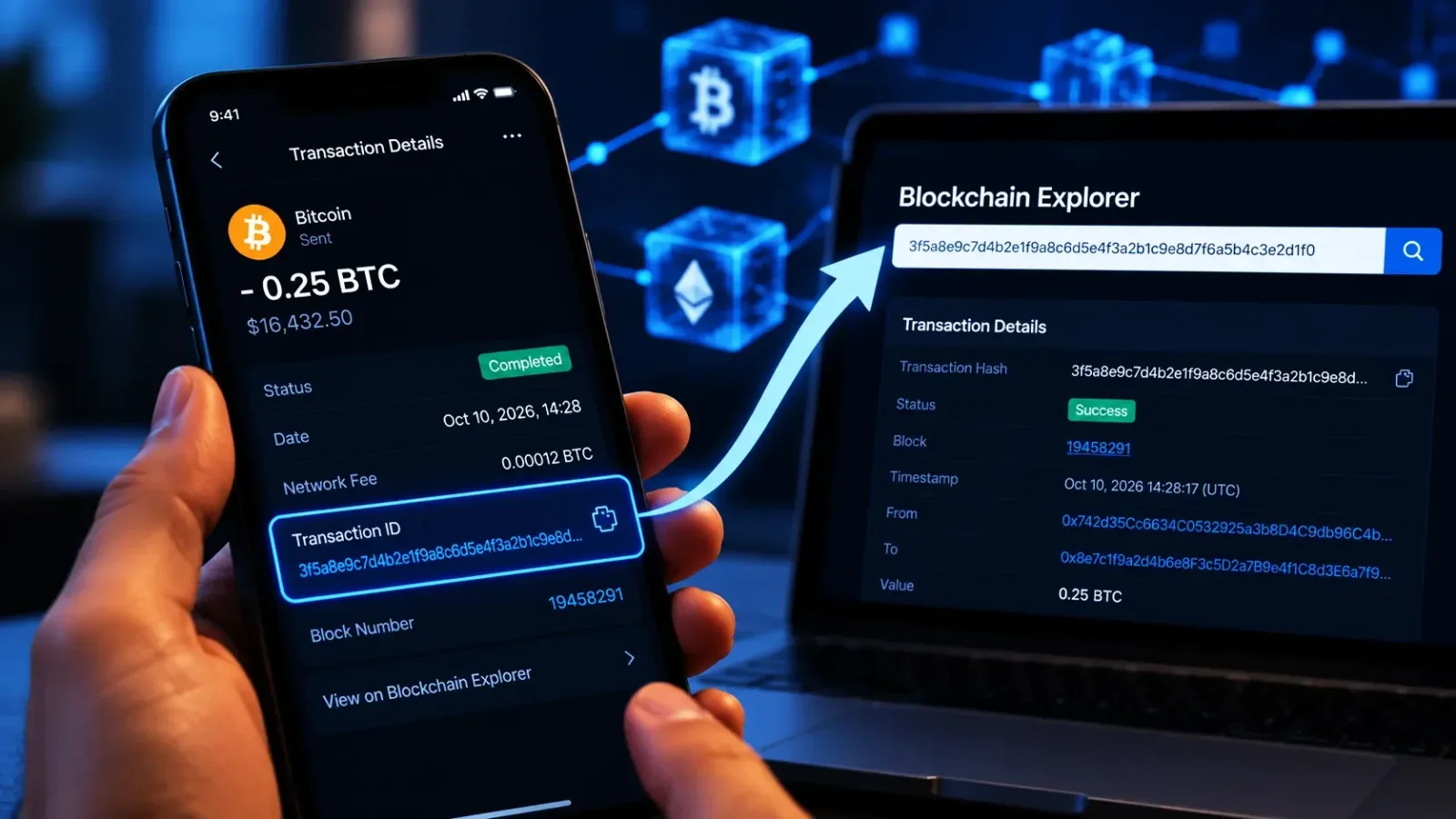
When you report a crypto scam, the FBI says the single most useful thing you can provide is transaction details: where the crypto went, how much, when, and the transaction ID. Yet many people report without them, simply because they don’t know where to find them.
This guide shows you where to find your transaction IDs and the wallet addresses you sent funds to, how to check them on the blockchain, and how to put everything into one simple record you can give to the authorities, your bank or a lawyer.
Key takeaways
- A transaction ID (TXID, or “hash”) is the unique reference for one transfer on the blockchain.
- The reliable place to find it is where the money left: your exchange or your own wallet, not the scam platform.
- Always copy and paste addresses and IDs. One wrong character makes them useless.
- Transaction IDs and wallet addresses are public, so they are safe to share with the authorities. Your recovery phrase, private keys and passwords are not, ever.
The Three Things Investigators Need
| Term | What it is | What it looks like |
|---|---|---|
| Transaction ID (TXID, transaction hash) | The unique reference for one transfer | A long string of letters and numbers, for example 64 characters on Bitcoin, or “0x” followed by 64 characters on Ethereum |
| Receiving address | The wallet the crypto was sent to | Bitcoin: starts with 1, 3 or bc1. Ethereum and similar networks: “0x” followed by 40 characters. Tron: starts with T |
| Network | The blockchain the transfer happened on | For example Bitcoin, Ethereum, Tron or BNB Smart Chain |
The network matters more than people expect. Tether (USDT), the coin used in many scams, exists on several networks, including Ethereum and Tron. A transaction ID only makes sense on the right one.
Where to Find Them
If You Sent Crypto from an Exchange
Most people buy crypto on a regular exchange and then send it to the scam platform. The exchange keeps a full record:
Open your transaction or withdrawal history
Look for “Transactions”, “History”, “Activity” or “Withdrawals”, on the website or in the app.
Open each withdrawal
Select a transfer to see its details. Look for “Transaction ID”, “TxID”, “Transaction hash” or “View on block explorer”.
Note the details
Copy the transaction ID, the destination address, the coin, the network, the amount and the date and time.
Download a statement
Many exchanges let you export your full history as a file. Save it. It is a strong record in its own right.
If You Sent Crypto from Your Own Wallet App
In wallet apps, open the activity or history list, tap the transfer, and look for the transaction ID or a link to view it on a block explorer. The page that opens shows the full transaction ID in its address bar and on the page.
The Scam Platform’s Deposit Address
Scam platforms usually show a deposit address, sometimes as a QR code. Screenshot it, including the website address, and keep any messages where someone sent you an address. But don’t rely on the scam platform’s own transaction history: its records may be fake. The record that counts is on the sending side.
If You Paid by Bank Transfer or Card
Your bank or card statement is the record. Note the date, the amount, the name of the receiving business and any reference. For wires, ask your bank for the full transfer details, including the receiving bank and account.
Checking a Transaction on a Block Explorer
A block explorer is a free public website that shows every transaction on a blockchain. Paste the transaction ID into the search box of the explorer for the right network, for example Etherscan for Ethereum, Tronscan for Tron, or a Bitcoin explorer for Bitcoin.
The transaction page shows:
- Status: whether it succeeded and is confirmed.
- From and To: the sending and receiving addresses.
- Amount and token: how much was sent, and in which coin.
- Timestamp: when it was confirmed.
Save the page as a PDF or screenshot. If a platform claims it “sent” you a withdrawal but can’t give you a transaction ID that shows up on an explorer, that is a warning sign in itself.
Put It All in One Record
A simple table, one row per transfer, makes your report clearer and saves time for whoever reviews it. Use a spreadsheet or a document:
| Date and time | Amount and coin | Network | Sent from | Sent to (address) | Transaction ID |
|---|---|---|---|---|---|
| Mar 3, 2026, 4:12 pm ET | 2,500 USDT | Tron | Your exchange account | T… (paste in full) | (paste in full) |
| … | … | … | … | … | … |
Add your bank and card payments as separate rows, and keep screenshots in a folder named by date.
Struggling to piece your records together?
A member of our team can go through it with you for free and tell you what matters for your case.
Mistakes to Avoid
- Typing instead of pasting. Addresses and IDs are long and case-sensitive on some networks.
- Cropped screenshots. Make sure the full address or ID is visible, along with the date and the website address.
- Wrong network. If an ID doesn’t show up on one explorer, check which network the transfer used.
- Sharing the wrong thing. Never share your recovery phrase, private keys, passwords or one-time codes, with anyone, including people who say they are investigators.
What to Do Next
With your records in hand, report the scam: in the US, to the FBI at ic3.gov (our step-by-step IC3 guide shows where each detail goes), and in Canada, to the Canadian Anti-Fraud Centre. See where to report for every option.
Questions People Ask
Is It Safe to Share My Transaction ID and Wallet Address?
Yes, with the authorities, your bank or a professional you have verified. Transactions on public blockchains can be seen by anyone already. What you must never share is your recovery phrase, private keys, passwords or one-time codes.
The Scam Platform Showed Me a Transaction ID for a Withdrawal, but I Never Received Anything. What Does That Mean?
Look it up on the correct block explorer. If it doesn’t exist, or the funds went to an address that isn’t yours, the platform’s records are false. Save the screenshot: it is useful evidence.
My Exchange Account Has Been Closed. Can I Still Get My History?
Contact the exchange’s official support and ask for a statement of your transactions. Regulated exchanges generally keep records even after an account is closed.
Can I Trace Where the Money Went After It Left My Account?
You can follow the receiving address on a block explorer and see where funds moved next, but interpreting it takes experience, and it won’t get money back on its own. Give your records to the authorities, who can act on what they find.
This guide is general information, not legal or financial advice. See our Disclaimer.